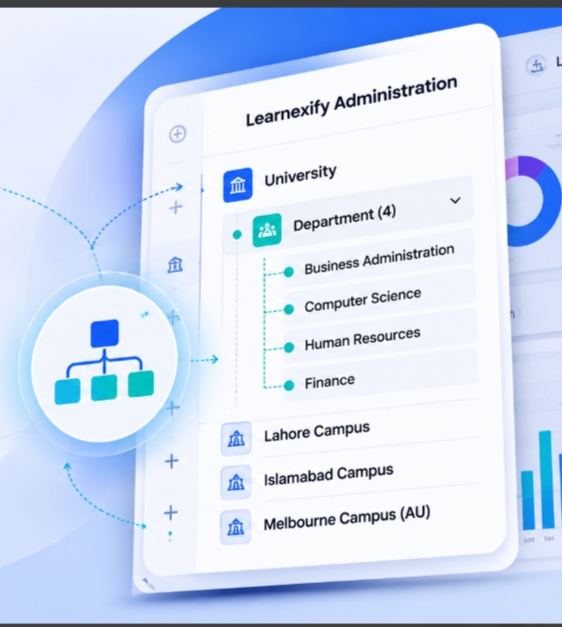
Map Your Organization Natively.
Control Permissions Effortlessly.

Stop forcing complex institutional or corporate structures into rigid, flat user lists. Learnexify's advanced Hierarchy Management engine lets you build, manage, and scale nested user sets that perfectly reflect your real-world organizational chart. Assign courses, manage permissions, and track aggregate compliance across multi-tiered departments with a single click.

The Core Purpose (The Philosophy)

Built for the Real Complexity of Growing Organizations

Most learning management systems treat users like a giant, disorganized spreadsheet. When you need to deploy a course to a specific group, manage varying levels of staff authority, or run a departmental progress audit, you are forced to manually tag users one by one or create messy, independent workarounds.

We engineered Learnexify with an intrinsic, multi-tier organizational mapping system because structure dictates efficiency. By mirroring your actual institutional or corporate framework directly within the platform, administration becomes intuitive. Create top-level parent sets, nest infinite sub-sets underneath them, and let permissions and course assignments flow down the chain naturally. It is a unified environment built to give you absolute control over your scaling ecosystem.

Eliminating the Administrative Friction of Flat User Systems

When software fails to match your actual organizational layout, your administrative team pays the price in wasted hours.

The Pain Points
1. Semester & Enrollment Configuration Grind

Wasting weeks manually launching individual class batches for every single course and separately assigning hundreds of students to those individual classrooms every semester.

2. Data Security & Permissions Mess

Granting sub-instructors, deans, or regional managers too much administrative access just so they can monitor their specific teams.

3. The Reporting Black Hole

The absolute inability to see how a specific division, office location, or academic department is performing as a collective whole.

THE PAIN
LEARNEXIFY SOLUTION
Learnexify Solution
Automated Tracks & Cascading Enrollments

Handle enrollment at the Program level. Launching a Track auto-creates class instances and enrolls cohorts instantly. Flow assignments from master groups down to nested sub-sets in seconds.

Scoped Role Boundaries

Assign roles to explicit branches of your hierarchy tree. Managers get absolute visibility over designated sub-sets, while global platform parameters remain completely invisible.

Aggregated Hierarchy Reporting

Pull data using advanced structural filters. Dynamically include or exclude sub-set trees to compile site usage and transcript metrics for entire branches without manual spreadsheet math.

Dual Persona Split

One structural engine. Custom fit for your institutional framework.

Universities & Colleges
(The Academic Tree)

Model your entire academic catalog and student body cleanly. Build your hierarchy from University Central Portal down to distinct Colleges, Departments, Semesters, and Batches. Manage course sets and generate live class rosters perfectly grouped by cohort.

Corporate & Enterprise
(The Workforce Pipeline)

Organize your workforce by operational reality. Segment permissions and tracking by Global Headquarters down to Regional Offices, Functional Departments, and Job Roles. Monitor onboarding pipelines, compliance certificates, and system usage profiles by specific teams.

Feature Deep-Dive: Administrative Controls

Precision Architecture Control Panels

Navigation Framework 01
Seamless User Set Navigation Tiers

Map your institution cleanly using a structured User Set framework. Establish master User Sets for each campus and nest sub-User Sets for individual departments, creating a clear navigation path. Say goodbye to confusing configuration sub-menus. Build and adjust your organizational architecture using a clean, visual hierarchy dashboard.

Access Security 02
Scoped Administrative Mapping

Safeguard system integrity by setting precise behavioral boundaries. Assign custom structural permissions to department heads, operations managers, registrars, or local site administrators. They gain full operational capacity within their assigned branch while the rest of the platform remains strictly locked.

Live Propagation 03
Single-Point Configuration Refreshes

Modify organizational settings, target parameters, or active fields from a centralized dashboard. Changes save instantaneously, automatically propagating throughout the underlying architecture levels without requiring system reboots or database re-indexing.

Bulk Operations & Automations

High-Velocity Group Action Tools

blueprint

Master Course Description Blueprints

Eliminate repetitive data entry when building out your academic catalog. Manage all core curriculum data including course content, document resources, and grading frameworks directly within centralized Course Description master records. When you design a Program, it pulls directly from these master blueprints. This ensures that when your administration launches a new Program Track, the system instantly generates perfectly configured active class instances for all associated semesters in one seamless action, maintaining absolute consistency across your entire department.

Push training and curriculum changes instantly. When a course description, document resource, or grading framework is assigned to a parent user set, all nested sub-sets inherit the configuration immediately. This completely eliminates repetitive manual data entry across identical departments.
notification

Targeted Notification Routing

Keep lines of communication efficient and precise. Send important updates, platform reminders, or policy announcements exclusively to a specific branch of your organizational tree. Reach the exact user sets that need the information without interrupting unrelated cohorts or locations.

reallocation

Multi-Tier User Reallocations

Moving students between batches or staff between regional offices shouldn't break their training history. Effortlessly shift individual profiles or entire user cohorts between hierarchy branches. The system instantly recalculates their training tracks, structural managers, and group-wise analytics.

Technical Control & Reporting Alignment

Fueling the Advanced
Reporting Engine

Your organizational structure shouldn't just look pretty on a dashboard—it should drive your operational intelligence. Learnexify's Hierarchy Management is fully hardwired into our analytics core.

When running complex audits, administrators can toggle the advanced "Tree Option" filter. This allows you to check a parent department box and instantly compile data from every single sub-set underneath it.

Whether you are generating comprehensive sitewide transcripts, gathering minute-by-minute time summaries for funding justification, or auditing active certificate expirations, your reports compile cleanly along your real-world organizational lines.

Transcripts
Funding
Audits
Advanced Reporting Engine Visual

Engine Status

Operational Intelligence

Why Modern Organizations Prefer Learnexify

Native Structural Intelligence vs. Chaotic Flat Lists

See how transitioning to a self-contained organizational hierarchy eliminates tracking friction compared to legacy, disorganized environments.

Legacy Platforms (e.g., Moodle)
01

Flat User Lists

Users sit in one massive pool. Segmenting them into explicit cohorts or sub-departments requires complex custom tags.

02

Repetitive Course Assignments

Admin teams must manually assign courses to users individually or configure separate enrollment rules for every group.

03

All-or-Nothing Permissions

Difficult to restrict manager visibility. Sub-admins often see data from other departments or global setups.

04

Fragmented Departmental Audits

Compiling a report for an entire division requires exporting raw data and filtering it inside spreadsheets.

05

IT Dependency for Structural Changes

Restructuring a department or batch setup often means filing support tickets to modify databases.

Learnexify Hierarchy Engine
01

Native Nested Trees

Build infinite levels of parent-child groups that match your real-world org chart cleanly out of the box.

02

Structural Program Mapping

User Sets are used strictly to organize campuses and departments for clean navigation. Once a user navigates to a department, they access its assigned Programs and Tracks, which automatically deploy the correct course instances and enrollments all at once. Assign a course set to a top-level parent tier once; all underlying sub-sets inherit the deployment instantly.

03

Strictly Scoped Boundaries

Managers and instructors are locked to their explicit branch, ensuring complete data security across teams.

04

Multi-Level Workflow Reporting

Access targeted visibility across different system layers. Seamlessly retrieve precise data—whether tracking active course completions by user sets, evaluating performance at the Program level, or monitoring student cohorts via Track timelines.

1-Click Tree Filtering: Use the analytics dashboard to select a parent group and instantly compile aggregated metrics across all its sub-sets.

05

Turnkey Admin Control

Rearrange user sets, modify branch parameters, and move cohorts entirely from a non-technical interface.

Bring absolute clarity to your organizational training.

Discover how Learnexify's structural hierarchy mapping can take the headache out of platform administration for your team.

Book Your Structural Design Consultation